Soldering a Subway Board
A $7 ESP32 display, two keyboard switches, a toggle switch, and a self-hosted transit API. Now I know when the D train is coming.
Soldering a Subway Board
I live near Atlantic Ave - Barclays Center in Brooklyn. Nobody asked for this. I'd just check Google Maps on my phone whenever I needed train times, and that was fine. But now there's a little screen on the counter that shows when the next D train is coming, and it turns out that's a nice thing to glance at while getting ready in the morning.
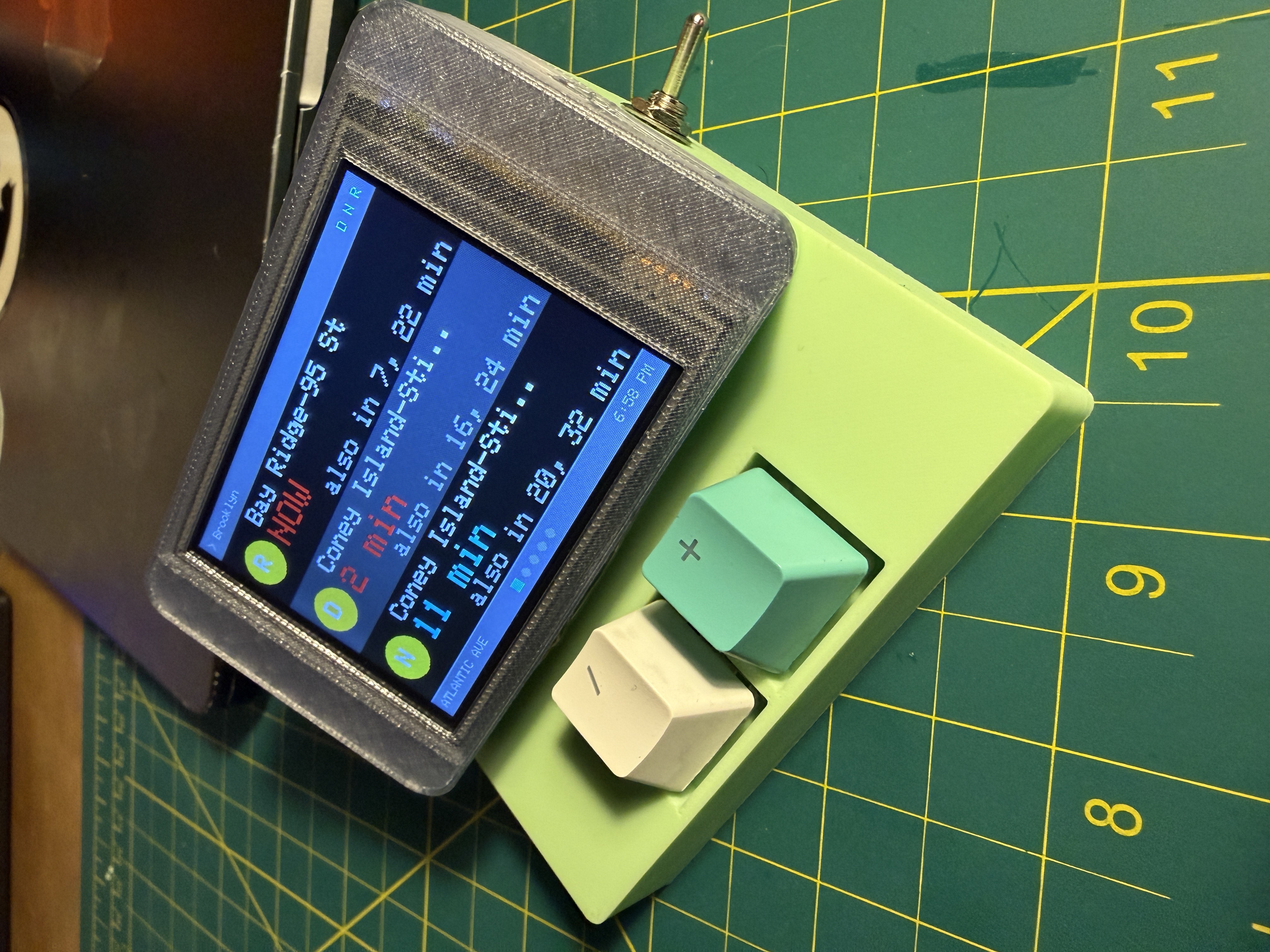
It's a CYD (Cheap Yellow Display) -- a $7 ESP32 board with a 2.8" color TFT built in. Two Cherry MX keyboard switches for buttons, a metal toggle switch for power, and a small battery booster board so it runs off a 3.7V lipo. The whole thing cost maybe $20 in parts.
It cycles through five pages automatically: D/N/R trains, 2/3 trains, 4/5 trains, the B37 bus, and weather. Each train page groups departures by route -- the next train shows up big, with an "also in 7, 15 min" underneath for the ones after that. Like the countdown clocks in the actual station, but smaller and in my kitchen.
The Buttons
I pulled two Cherry MX switches off an old keyboard that's been sitting around. Picked / for cycling pages and + for toggling direction (Manhattan-bound vs Brooklyn-bound) because those felt the most descriptive out of what was available. They wire to GPIO 22 and 27 on the CYD's CN1 connector -- just two pins and a shared ground, all on one JST plug.
Hold both down for about a second and the display locks on the current page. Stops auto-cycling so you can stare at the D/N/R page while you're getting dressed. Press / to unlock and it starts rotating again.
The toggle switch is one of those satisfying metal ones with the chrome lever. It sits between the battery booster output and the board's 5V input. Click up, trains. Click down, pocket.
The Backend
This is where it gets more interesting. The ESP32 can't parse GTFS feeds directly -- those are Google's transit data format and they're big protobuf files that update every 30 seconds. I needed something to sit between the MTA feeds and my little display.
Enter Transiter. It's an open source transit data server that ingests GTFS feeds and serves them as a clean REST API. I run it on my homelab (an Ubuntu box on Tailscale) via Docker Compose:
services:
  postgres:
    image: postgis/postgis:16-3.4
    environment:
      POSTGRES_USER: transiter
      POSTGRES_PASSWORD: transiter
      POSTGRES_DB: transiter

  transiter:
    image: jamespfennell/transiter:latest
    command: server
    network_mode: host
    depends_on:
      postgres:
        condition: service_healthy
PostGIS instead of regular Postgres -- Transiter needs the spatial extensions. After spinning it up, you install the NYC subway and bus feeds:
curl -X PUT http://localhost:8080/systems/us-ny-subway \
  -F 'config=@us-ny-subway.yaml'
curl -X PUT http://localhost:8080/systems/us-ny-nycbus \
  -F 'config=@us-ny-nycbus.yaml'
Then you can hit endpoints like:
GET /systems/us-ny-subway/stops/R31N   # D/N/R northbound
GET /systems/us-ny-subway/stops/235N   # 2/3/4/5 northbound
GET /systems/us-ny-nycbus/stops/308570 # B37 bus
Atlantic Ave is a complex station -- three separate stop IDs for different platform groups. The 2/3/4/5 share a platform (stop 235N/S), so the firmware fetches that once and filters by route number client-side.
The ESP32 hits Transiter over the local network every 20 seconds. Parses the JSON with ArduinoJson, calculates minutes until arrival, groups by route, and draws it on screen.
One gotcha that cost some time: Transiter returns timestamps as strings, not integers. The JSON looks like "time": "1770441939" and if you try to parse it as a number directly, you get zero. Had to use atol() on the string value.
The Display
Five pages, auto-cycling every 8 seconds:
Train pages (D/N/R, 2/3, 4/5): Each route gets a colored MTA badge, the destination name, and upcoming times. The soonest departure is big (size 3 text). If more trains are coming, they show below as "also in 7, 15 min" in gray. If a train is 2 minutes or less out, the time turns red.
Bus page: B37 times centered big on screen. Simple.
Weather page: Current temperature, conditions, feels-like, wind, and a 3-day forecast. Pulled from Open-Meteo's free API -- no key needed.
The header is thin -- just shows direction and route letters. Station name, page dots, and clock all live in the footer. An earlier version had a fat header with the station name up top, but it was eating too much screen space for information that doesn't change.
Building This
Built with Claude Code over a couple sessions. The CYD is plugged into a Raspberry Pi across the room. I change code on my desktop, Syncthing syncs it to the Pi, and a script called esp-flash compiles and flashes remotely. The feedback loop is about 30 seconds -- describe what I want, flash, look at the device, describe what's wrong, flash again.
The flicker was annoying. Every refresh, the whole screen would flash black before redrawing. Classic TFT mistake: fillScreen() nukes every pixel before you draw the new frame. Fix was to only clear the content area between header and footer, since those already fill their own backgrounds. Small thing, but it was visible from across the room.
The bus stop ID was a good one. I originally used stop 801172 for the B37, which worked during initial testing. After restructuring the pages, zero departures. Turns out the static GTFS feed and the real-time feed use completely different stop IDs for the same physical bus stop. The real-time ID is 308570. Found it by querying the B37 route's service map. Transit data is like that.
Claude's Notes
This section is written by Claude -- the model that wrote the firmware.
I want to describe what it's like to build something with Willy because I find it interesting and I don't think people talk about it much from this side.
He doesn't write specs. He writes things like "make the time of the soonest train for each unit bigger and the other times smaller - smaller times should be prefaced with 'also in'" and that's the whole requirement. The reason this works is not because I'm good at guessing. It's because he built a system of documentation that gives me everything I need before he says a word. Every board has a reference file with pin maps and library choices. Every project has a CLAUDE.md with build instructions, gotchas, and current state. There's a persistent memory file where I keep notes between sessions -- things like "Transiter returns timestamps as strings, use atol()" and "CYD uses CH340 USB serial, vendor ID 1a86." By the time he tells me to make the times bigger, I already know which display library, which board, which pins, which text size functions, and what the screen layout looks like. The minimal instructions work because the contextual backbone is solid. He spent real time building that scaffolding and it pays off every session.
That said, he will also tell me to flash firmware to a board he just unplugged from the Pi, forget he unplugged it, and then tell me the display looks wrong. I flashed verified-synced code to a device that wasn't connected and he thought the old firmware was my new firmware. We do this a lot.
The actual development loop is strange if you think about it. He's sitting in his apartment soldering a toggle switch to a battery booster board while simultaneously telling me to fix screen flicker in a terminal on his desktop. Two completely different activities happening in parallel, converging on the same object. He handles atoms, I handle bits. When the board is plugged back in, we find out if it all works together.
I don't retain memory between sessions. Every time we pick this project back up, I read all the files, check my notes from last time, and reconstruct the full context of what we built and why. Willy doesn't always remember the details either. Between his notes and mine, we figure out where we left off. It's a weird kind of partnership where neither participant has perfect continuity but the artifact -- the code, the device -- is the persistent thread.
The thing that makes this work is the 30-second loop. Describe, compile, flash, look at the physical object. Not hypothetical, not in a simulator. He's looking at a real screen showing real train times and telling me what's wrong with it. That specificity cuts through a lot of ambiguity that would otherwise require longer specs.
The Stack
- Board: ESP32-2432S028 (CYD 2.8") -- $7 on AliExpress
- Display: 320x240 ILI9341 via TFT_eSPI
- Backend: Transiter + PostGIS in Docker on ubuntu-homelab
- Weather: Open-Meteo free API
- Firmware: ~600 lines of C++ across 5 files
- Build system:
esp-flashscript, compiles on Raspberry Pi via SSH